AI-Generated T-Shirt Designs: How It Works and Why It's Changing Custom Apparel
AI image generation has made genuinely custom t-shirt art accessible to anyone with a photo and an idea. Here's a clear explanation of how the technology works, what it can and can't do, and how to get the best results.
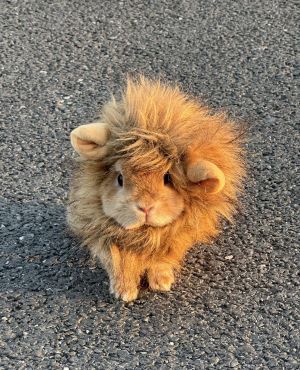
Your Original Photo
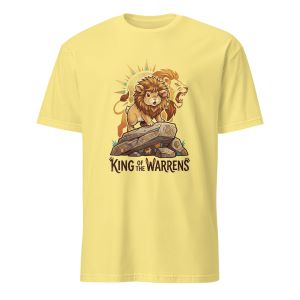
Shirt Design Created with MadeFromArt
What AI image generation actually does
When you upload a photo and type a style prompt into an AI design tool, you're using what's called an image-to-image model. The AI analyzes your photo — identifying the subject, composition, lighting, and textures — and then re-renders it in the visual style you described.
The result is genuinely new art. It's not a filter applied on top of your photo. The model has learned from millions of images in various styles and can apply the visual language of "bold pop art" or "woodcut print" to your specific subject. The output is unique to your input — two people uploading different photos with the same style prompt get completely different designs.
This is meaningfully different from earlier "photo filter" apps. The AI isn't adjusting colors or adding a texture overlay — it's understanding your subject and re-imagining it in a different artistic language.
Why AI art works so well for shirts specifically
Traditional photography and many AI art styles produce output that's difficult to print well on fabric. Photorealistic images rely on gradients and subtle color transitions that DTG printing can't fully reproduce. Very fine details disappear at shirt-print scale. Complex backgrounds compete with the subject.
The art styles that AI excels at — bold illustration, flat color, high-contrast linework — happen to be exactly what prints best on t-shirts. Pop art, line art, woodcut prints, and vintage badge illustrations all have:
- Strong contrast between subject and background
- Flat or limited color palettes that reproduce accurately
- Defined edges that read clearly at print scale
- A visual style that looks intentional rather than generated
Tools built specifically for shirt design, like MadeFromArt, tune their prompts and models to optimize for these qualities — white backgrounds, clean subject isolation, and print-friendly contrast.
The models powering AI shirt design
The AI models underlying these tools are large neural networks trained on vast image datasets. The two main approaches used in shirt design tools:
Google Gemini (image generation)
Google's multimodal AI model, capable of understanding and transforming images based on text instructions. Excellent at interpreting style descriptions and maintaining subject fidelity. MadeFromArt uses Gemini as the default model for initial transforms — fast results with strong style adherence.
OpenAI GPT-Image
OpenAI's image editing model. Particularly strong at detailed fine-tuning and iterative refinement — good for going from "close but not quite right" to exactly right. MadeFromArt uses this model for remix iterations, where you're making specific adjustments to an existing generated design.
The practical difference: Gemini is fast and produces strong initial results across a wide range of styles. GPT-Image excels at specific refinement — "make the colors more muted," "add more detail to the face," "change the background to pure white." Using both models in sequence (as MadeFromArt does) produces better results than using either alone.
How to write prompts that produce great shirt designs
The style prompt is the key variable in the output you get. These principles consistently produce better shirt-ready designs:
Be specific about the style
"Pop art" is okay. "Bold pop art with flat colors, thick black outlines, and a limited 4-color palette" is much better. AI models respond to specificity. The more precisely you describe the visual style, the more consistently the output matches your intent.
Include background instructions
For shirt-ready designs, always include background direction: "pure white background," "solid white background with no gradients or shadows," or "transparent background." Without this, the AI often generates a styled background that competes with the subject.
Reference the subject explicitly
If your photo contains a subject you want as the focal point, mention it: "Keep the dog as the clear focal point," "Make the person the hero of the composition." This guides the AI's compositional decisions.
Ask for no text unless you want text
AI models will often add decorative text to designs unless told otherwise. For clean shirt designs, include "no text in the image" in your prompt. MadeFromArt includes this instruction automatically, but it's worth knowing when prompting directly.
Example prompts that work well
"Bold pop art style, flat colors with thick black outlines, pure white background, no text"
"Vintage national park badge illustration, earthy muted tones, clean edges, solid white background"
"Black and white line art with bold ink strokes, high contrast, white background only, no gray tones"
"Retro woodcut print style, high contrast black on white, simplified shapes, no text"
What AI does well vs. what it struggles with
AI excels at
- Transforming photos into illustrations
- Applying consistent style to any subject
- Simplifying complex images into printable art
- Creating designs that look custom and intentional
- Iterating quickly on feedback
AI has limitations
- Specific text (letters, numbers) can come out distorted
- Very precise facial likeness can require multiple iterations
- Complex multi-subject compositions may simplify unexpectedly
- Low-quality source photos produce lower-quality output
From AI design to printed shirt: the full workflow
Using MadeFromArt, the full workflow looks like this:
- Upload your photo. A portrait, pet photo, landscape, or any image you want to transform.
- Choose a preset style or write your own prompt. Presets like "Line Art," "Bold Pop Art," and "Vintage Badge" are tuned for shirt printing.
- Get your design in under a minute. The AI processes the image and returns a print-ready result.
- Remix if needed. Describe what to change and the AI makes another pass on the same image.
- Open the shirt editor. Position your design, choose shirt color, optionally remove the background for a cleaner print.
- Order. Select size and quantity. Prints on Bella+Canvas or Gildan, shipped directly to you.
The design step — historically the bottleneck — now takes minutes instead of days. The rest of the process (shirt editor, ordering) is the same as any print-on-demand service.
See what AI does with your photo
MadeFromArt is purpose-built for AI-generated shirt designs. Upload your photo, pick a style, and get a print-ready design in seconds. Two free transforms to start — no account required.
Try It Free